


 Website Design Custom Excel Design About Us Contact Us
| Home |
| Website Design |
Web Design Portfolio |
| Excel |
| Tutorials |
| Contact |


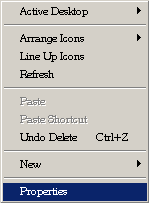
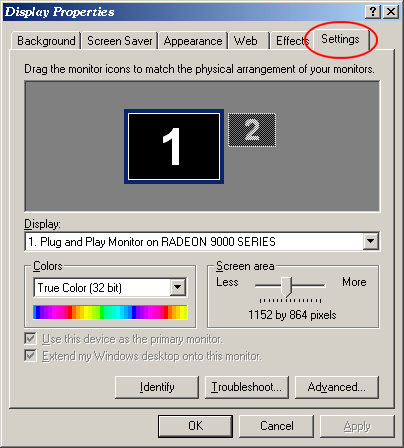
Changing Screen ResolutionThe way visitors view your website will depend on many factors. One of these factors is screen resolution. This tutorial will show you how to change your screen resolution to see how others may view your website. The most common screen resolution to design web pages to is 800x600 (though 1024x768 is becoming more common). Click to see your current screen resolution settings.
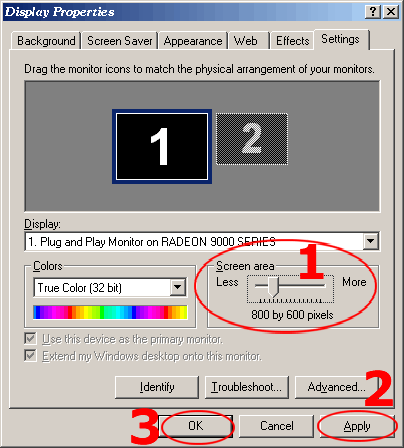
1. Move the slider over to select a different resolution. 2. Click Apply. A dialog box will pop up - click OK. 3. Click Yes or No if you want to keep the new settings.
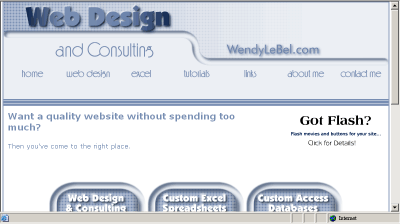
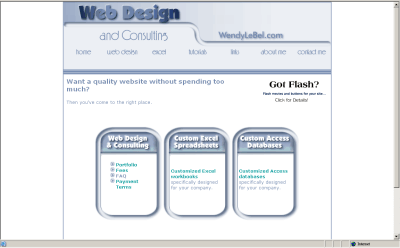
Sample site at 800x600
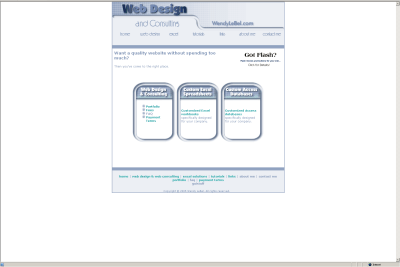
Sample site at 1152x864
Sample site at 1792x1344 (not all monitors have higher resolutions).
|





Home | Website Design | Web Design Portfolio | FAQ | Web Design Checklist | Terms | Fees | eCommerce
Custom Excel Design and Programming | Tutorials | Links | About | Contact | Top
Copyright © 2005 - Allurl Design™. All rights reserved.

